Podcasts vs Audiobooks & Spotify Guide: The 3.0x Speed Strategy

Key Takeaways
- The Brain Gap: Humans speak at ~150 wpm but think at ~400 wpm. This gap causes distractions.
- The Sweet Spot: Comprehension remains high up to 275 wpm (approx 1.75x speed).
- Silence Removal: Using "Smart Speed" apps is more effective than raw speed increases.
- The Rule: Speed up information (Non-fiction), slow down experience (Fiction).
Table of Contents
There is a strange phenomenon in the speed listening community. I call it the "Gear Shift Paradox".
You struggle to finish a chapter of Atomic Habits on Audible at 1.75x. It feels like a mental workout. You have to sit still, close your eyes, and focus.
But ten minutes later, you switch to a podcast like The Diary of a CEO or Huberman Lab. You crank the speed dial to 2.5x, maybe even 3.0x. You start washing the dishes. You organize your room. And miraculously, you understand everything.
How is this possible? How can your brain handle 450 words per minute in one app, but struggle with 250 in another?
The answer isn't in your brain. It's in the Signal-to-Noise Ratio of the audio itself.
In this deep dive, we are going to deconstruct the physics of "Conversational Audio". We will also investigate the confusing new world of Spotify Audiobooks (and the 15-hour trap everyone falls into), before giving you the ultimate protocol to hit 3.0x speeds safely.
Part 1: The Physics of "Air"
To understand why you can listen to podcasts faster, you need to visualize sound as a physical material.
The Brick vs. The Sponge
Audiobooks are Bricks.
An audiobook is scripted. Every sentence was written, rewritten, edited, and then performed by a professional actor. The density of information is maximum. There are no wasted syllables. The pauses are dramatic, calculated choices.
Podcasts are Sponges.
A podcast is conversational. Even smart hosts like Tim Ferriss or Lex Fridman have to think while they speak. This creates:
- Micro-pauses: Searching for a word (0.5s - 1s).
- Fillers: "Um", "Uh", "Like", "You know" (Zero information content).
- Redundancy: Repeating the same point three times to clarify.
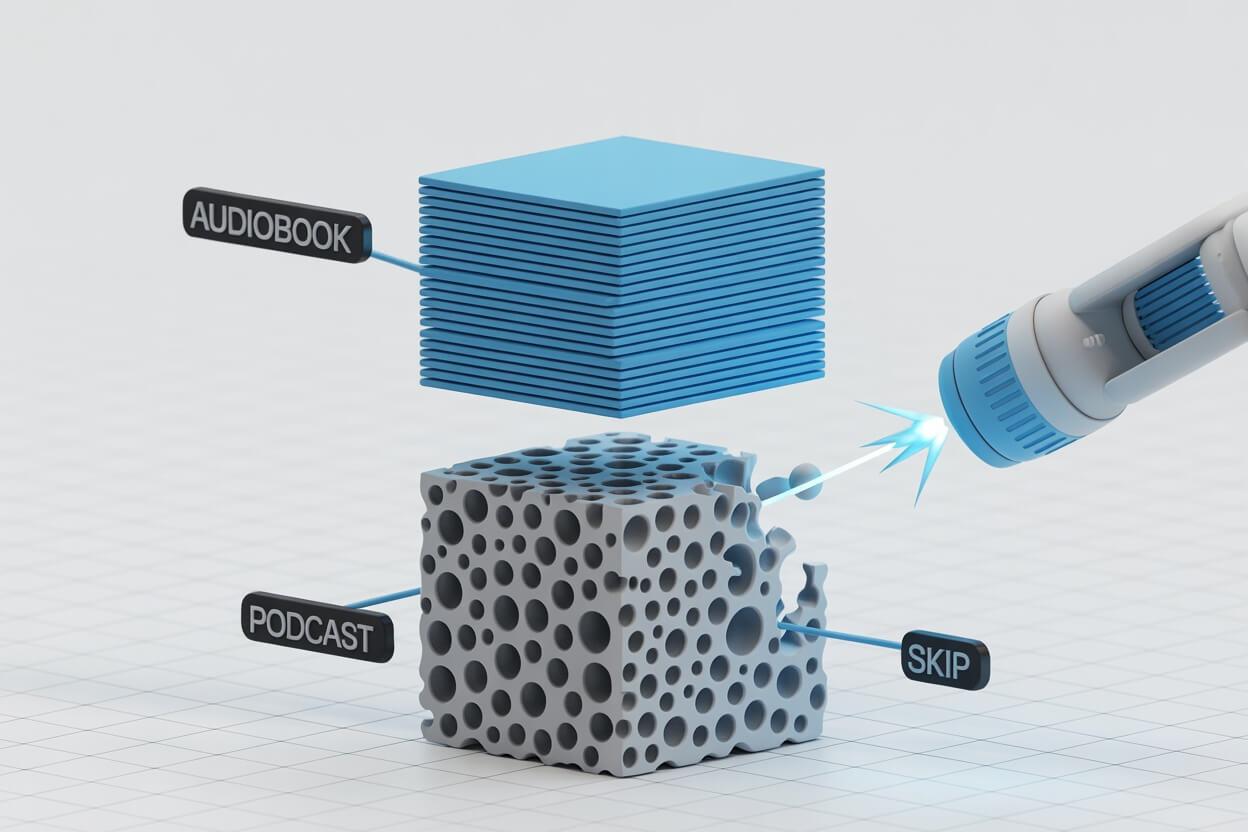
When you listen to a podcast at 1.0x, you are spending roughly 30% of your time listening to silence or hesitation.
The Mathematical Reality:
Accelerating a podcast to 1.5x doesn't actually speed up the information flow; it merely compresses the "Air" to normal levels. This is why 3.0x on a podcast often feels like 1.8x on an audiobook. You aren't processing faster; you are just skipping the waiting time.
Part 2: The Spotify Audiobook Investigation
According to our search data, thousands of you are confused about Spotify's new audiobook offering. Let's clear up the confusion, because there is a massive trap here for speed listeners.
(Note: For a full breakdown of how Spotify compares to Amazon's ecosystem, read our Audible vs. Spotify vs. KU Battle).
The "15-Hour" Trap
Spotify Premium gives you 15 hours of audiobook listening per month.
The Question: "If I listen to a 10-hour book at 2.0x speed (taking 5 hours), does it use 5 hours or 10 hours of my allowance?"
The Answer: It uses 10 hours.
Spotify deducts the original track duration from your cap, regardless of your playback speed. You cannot "hack" the system to get more books by listening faster.
This makes Spotify a terrible platform for power users. 15 hours is barely one long biography (like Steve Jobs by Isaacson).
My Advice: Treat Spotify Audiobooks as a "Free Trial" service. Use it to test a book. If you like it, buy it on Audible or Libro.fm where you own the file and have no time limits.
The "Web Player" Hack (Speed Unlock)
However, if you must use Spotify (maybe for exclusive podcasts), you have noticed that the speed controls are limited.
On the Web Player, there is no native way to go above generic speeds or skip silence.
The Solution: Remember the Video Speed Controller extension we used for university lectures? It works on Spotify Web too.
- Open Spotify in Chrome (open.spotify.com).
- Press 'D' to boost speed to 2.3x, 2.7x, or whatever precise number you want.
- This bypasses Spotify's built-in 3.5x cap and allows granular increments.
Part 3: The "Silence Skipping" Tech (DSP)
If Spotify is the basic sedan of audio, apps like Overcast (iOS) and Podcast Addict (Android) are Formula 1 cars.
Their secret engine is Digital Signal Processing (DSP), specifically a feature called "Silence Skipping" (or Smart Speed).
This is NOT just increasing the speed.
The algorithm analyzes the waveform in real-time. It looks for volume drops (silence) and cuts them out instantly.
Why this changes everything:
- A 60-minute interview has about 10 minutes of silence/pauses.
- With Smart Speed, it becomes 50 minutes.
- If you then apply 2.0x speed, you finish it in 25 minutes.
You have achieved an effective speed of 2.4x, but the voices only sound like 2.0x. The distortion is lower. The clarity is higher.
Part 4: The Science of "Voice Boost"
Have you ever sped up a podcast to 2.0x and felt like the volume suddenly dropped?
You aren't imagining it. This is a psychoacoustic phenomenon.
When you compress audio time, you reduce the "energy" of the vowels (which carry the volume). The consonants (which carry the meaning) become sharp spikes, but the overall body of the voice feels thin and quiet.
If you are in a noisy car or subway, 2.0x becomes unlistenable because the background noise drowns out the thin voice.
The Solution: Voice Boost (Dynamic Compression).
Apps like Pocket Casts and Overcast have a "Voice Boost" feature. This is not just a volume knob. It is a Look-Ahead Limiter and Compressor.
- It amplifies the quiet parts (the thin vowels).
- It limits the loud parts (laughs, explosions) so they don't hurt your ears.
- It applies an EQ curve that boosts the "Presence Range" (3kHz).
Pro Tip: Always turn Voice Boost ON when listening above 2.0x. It compensates for the loss of audio fidelity caused by the speed algorithm.
Part 5: The Android Power User Guide
iPhone users have Overcast. But Android users arguably have the most powerful tool ever made: Podcast Addict.
It is ugly. It looks like an Excel spreadsheet. But it allows for "Automation Rules" that can save you hours of manual fiddling.
The "Set It and Forget It" Workflow
- Categorize: Create a category called "News" and one called "Comedy".
- Global Settings: Go to Settings > Player > Audio. Enable "Skip Silence".
- Category Rules:
- Long press the "News" category. Set Speed to 2.5x.
- Long press the "Comedy" category. Set Speed to 1.1x.
- The Result: When your playlist moves from The Daily to Conan O'Brien, the speed changes automatically. You never touch your phone while driving.
Part 6: The Podcast App Tier List
Stop using the default Apple Podcasts or Spotify app if you want to be efficient. Here is the definitive ranking for speed listeners.
| Tier | App | Killer Feature | Verdict |
|---|---|---|---|
| S-Tier | Overcast (iOS) | Smart Speed (Best Algorithm) | The absolute gold standard. |
| S-Tier | Podcast Addict (Android) | Per-Podcast Settings | Best for customization nuts. |
| A-Tier | Pocket Casts | Trim Silence + Voice Boost | Best cross-platform & UI. |
| B-Tier | Snipd | AI Highlights | Great for learning, bad for flow. |
| F-Tier | Spotify / Apple | None | Avoid. No silence skipping. |
Part 7: The "Commute Math" Protocol
Here is a practical way to use this. Don't pick a random speed. Pick a speed that fits your drive.

Scenario: You have a 30-minute commute. The episode is 60 minutes long.
Most people listen to half and stop. You are going to finish it.
- Step 1: Turn on "Silence Skipping". (Episode becomes ~50 mins).
- Step 2: Set speed to 1.7x.
- Math: 50 mins / 1.7 = 29.4 minutes.
You park your car exactly as the host says "Thanks for listening". This creates a dopamine loop ("Completion Effect") that makes the commute something you look forward to.
Use the audiobook speed calculator before you turn the ignition key.
Bonus: The "Sleep Protocol"
Speed listening is usually about intensity. But you can use it for relaxation too.
Many people listen to podcasts to fall asleep, but a fast-talking host is too stimulating.
The Deceleration Method:
- Start the episode at 1.0x.
- Set the Sleep Timer to 20 minutes.
- In Overcast/Pocket Casts, set the speed to 0.8x or 0.9x for your "Sleep" playlist.
The slow, deep voice lowers your heart rate. It acts like a lullaby. Do not use silence skipping here; you want the boring pauses.
Data-Driven FAQ (From Your Searches)
"Does listening at 2.0x use more data?"
No. You are downloading the same file (e.g., 50MB). However, because you consume more episodes per hour, your total hourly consumption increases. If you have a limited data plan, download on Wi-Fi.
"How to speed up Spotify on iPhone?"
Tap the "1x" button in the bottom left corner of the player. Spotify recently updated this to allow speeds up to 3.5x. However, you cannot remove silence.
"Why can't I listen to Spotify Audiobooks?"
If the book has a "Lock" icon, you have likely exceeded your 15-hour monthly limit. You must wait for the billing cycle to reset, or purchase a "Top-Up" (10 hours for ~$12).
Conclusion: Be an Audio Architect
The amateur listener presses play and accepts the default.
The pro listener looks at the content type ("Brick" vs "Sponge") and adjusts their toolset accordingly.
If it's a dense audiobook, treat it with respect at 1.5x on Audible. If it's a loose podcast, shred it at 3.0x on Overcast.
You are the architect of your own information consumption. Build wisely.
Ready to optimize your commute?
Open Podcast CalculatorRelated Articles

Is Speed Listening 'Cheating'? The Truth About Retention
Does listening at 2.0x ruin comprehension? We look at the neuroscience of attention, the 'Drift Effect', and why 1.0x might actually be hurting your focus.

How to Listen to Lectures at 2.0x (And Actually Pass)
University lectures are too slow. Here is the 'Search & Destroy' protocol using Video Speed Controller, Flow-Based Notes, and AI tools to save 90 hours a semester.

Why I Listen at 1.75x Speed (And Why You Should Too)
Why do we listen at 1.0x when our brains process at 400wpm? The honest truth about speed listening, pitch correction, and why 1.75x might be your new normal.